Table of contents
- Introduction
- Last update
- Welcome text
- Addons
- Download links
- Autofollow/Autoquest settings
- DailyNotes settings
- Let’s go!
- Recommended TQs
- Calculations
- Update history
1. introduction
1.1 Date of the last update
Last update: 2023-10-25
1.2 Welcome!
Hello my dear fellow players, I keep seeing how difficult it is for some of you to complete the daily quests. This is much more effective, easier and requires less effort. How? That’s what I want to tell you here!
2. addons
2.1 Download links
We mainly use two addons here (both links refer to Curseforge – from there you will certainly be able to download them on your own):Autofollow/AutoquestandDailyNotes
Please note: Both add-ons offer a wider range of functions than I will present here, only the settings relevant to our TQs will be discussed here.
2.2 Autofollow/Autoquest settings
 After installation, there is a button labeled “AF” near the minimap. To activate the AutoQuest function, we need to right-clickon this icon and check the “AutoQuest” box.
As we want to use DailyNotes in combination, we also activate the corresponding checkmark.  The“Messages”optionensures that messages about the TQs are displayed in the “General” chat window, while “Save on logout” tells the add-on to save its status (deactivated/activated) when you log out.
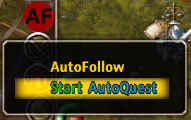
To finally activate Autoquest, we now have to clickon the minimap icon on the leftand then select “Start Autoquest” in the menu.
The minimap icon now shows that it is ready for use for our purposes by means of a turquoise color and change to “AQ”, as well as an output in the chat window.

2.3 DailyNotes settings
DailyNotes registers itself in the Addon Manager (if available). We can then open the settings window by clicking on . Alternatively, we can enter the command “/dn” in the chat line.

First, we check the “Auto-Quest” box at the top left to get our two addons to work together constructively. Then, under “Zone”, we search for the area in which our desired TQ is located.
Now the displayed daily quests change: all TQs belonging to the zone are displayed. I recommend sorting the quests either by level or name, which you can do by clicking on the corresponding table heading.
For our example, we will use the “heroic defense”.
All we have to do here is tick the checkbox at the beginning of the line. Done!
2.4 Let’s go!
This completes the settings and we only need to contact the quest giver to start the automatic acceptance and submission of the quests.
3. recommended TQs
3.1 Overview
| Quest level | Quest name | Area | Basic EP | Basic TP | Gold |
| 71 | Show fight | Rorazan | 273.970 | 27.397 | 2.995 |
| 79 | A little refreshment | Syrbal Pass | 376.098 | 37.610 | 20.000 |
| 91 | Research expert | Kashaylan | 635.168 | 63.517 | 48.146 |
| 94 | Clean wounds heal | Splinter current coast | 681.239 | 68.124 | 62.872 |
| 96 | Magic costs strength | Farsitan | 737.394 | 73.739 | 77.509 |
3.2 (68) Exhibition match
Required prerequisites: The quest “Elemental Prince” of the Morrok quest series must be completed.Charlevel for TQ: 68Location: Front Alliance Camp, RorazanQuest giver: Anthony Taz (47.2/57.8)Procedure: After accepting the quest, speak to the quest giver again and start the TQ. The quest giver spawns an opponent with comparatively few health points that you have to kill. Once this has been completed, the TQ is fulfilled and can be submitted.
Helpful macro:
| /run dqc,dqpd=Daily_count() if UnitLevel(“player”)<78 and dqc==10 then UseItemByName(“Tagesquest-Karte”) end GC_SetMouseMoveEnable(true) TargetUnit(“focus1”) CastSpellByName(“Angreifen”);/wait 0.2/run OnClick_QuestListButton(3,1)/wait 0.2 /run SpeakFrame_CompleteQuest() /wait 0.2 /run TargetUnit(“focus1”) CastSpellByName(“Attack”) /wait 0.2 /run OnClick_QuestListButton(1,1) AcceptQuest() /wait 0.2 /run CastSpellByName(“Attack”) /wait 0.2 /run ChoiceOption(1) /wait 2 /run TargetNearestEnemy() /wait .8 /run CastSpellByName(“Fireball”) GC_SetMouseMoveEnable(false) |
Notes on macro use:
- The macro contains a lot of characters, if not already installed the addon “ExtendedMacroIcons” is strongly recommended!
- The quest giver must be set as a focus target!
- The “Fireball” spell may have to be replaced by another spell/skill!
- The macro uses TQ cards independently until the class has reached level 78, then you normally switch to the next TQ.
3.3 A little refreshment
Required prerequisites:Charlevel for TQ: Location: Quest giver:Procedure: Helpful macro:
3.4 Research expert (“spin the bottle”)
Required prerequisites:Charlevel for TQ: Location: Quest giver:Procedure: Helpful macro:
3.5 Healing clean wounds (“first aid”)
Required prerequisites:Charlevel for TQ: Location: Quest giver:Procedure: Helpful macro:
3.6 Magic costs power (“circle riding”)
Required prerequisites:Charlevel for TQ: Location: Quest giver:Procedure: Helpful macro:
4th calculations
5. update history
5.1 History
2022-12-14: Basic framework created, most important chapters for the first release added2023-10-25: Show fight details added, to-do list started
5.2 To-Do
- Insert zombie quest (land of doom)
- Insert butterflies (Xaviera)