[Guide] Transfer of the magic closet
Hello dear community,
Below is a short guide on how to transfer the magic closet after a server merge.
Important: Make sure that you are not logged into the game on the game account whose closet you want to transfer.
(If in doubt, just close all Runes of Magic clients you have open ;) )
Important the second: The first steps of this guide assume that you are playing Runes of Magic via the Gameforge client.
If you have created your Runes of Magic account via Steam, you can open the RoM account management via the corresponding link in the spoiler below and start directly with step 3.
Login for account management via Steam:
– German
– English
– Polish
– French
– Spanish
– US
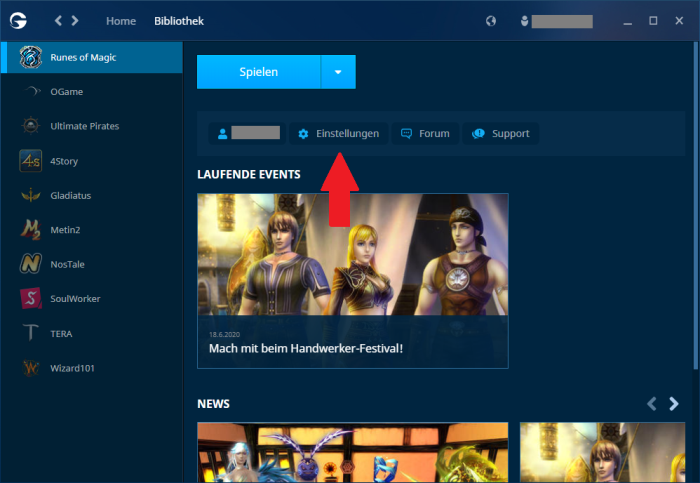
- Open your Gameforge client and click on the Settingsbutton belowthe Play button
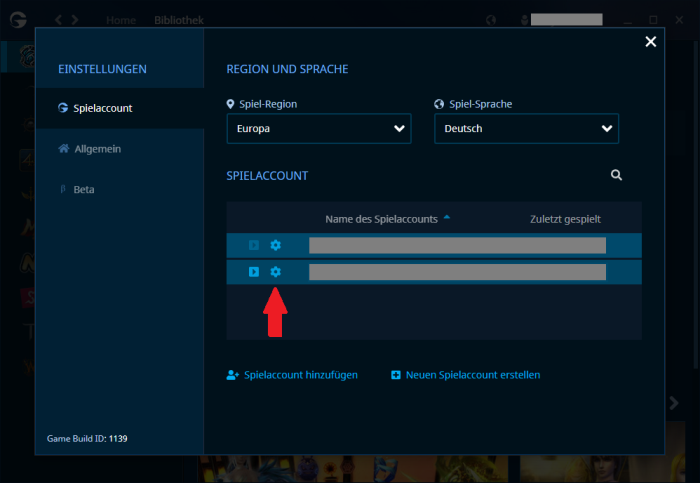
- Now click on the small cogwheel next to the desired account name
- Now the “old” Runes of Magic will open in your web browser and in the bottom right-hand corner you will find a“Magic Wardrobe” box.
Click here on the continue button

- You will now be presented with a drop-down menu with the various closets whose contents can be transferred. (The dropdown menu also contains closets from previous mergers of game servers ;) )
To merge the game servers Kadmos + Kerub => Kadmos, either select the corresponding entry where your character was located before the merge.
- After clicking on Next, the following menu will be displayed:
On the left-hand side, you will see all the items in your
The contents of the closet on your old game server will be displayed on the left and the contents of the closet on your new game server on the right.In addition, the number of remaining free places is displayed on the right-hand side.
(Yes, in RoM it is possible that your closet has 98.8795 free spaces xD^^” )If you have activated additional closet pages on your old server, you can also transfer them here.
- Select the desired skins on the left-hand side and then click on the small yellow button between the two lists.
- Once you have transferred the desired or all skins, you can close the website.
- (optional) Ideally, you should now wait a short moment (3-5 minutes)
- Log back into the game and check the contents of your magic closet.


0 Comments